
Digital files are made up of several parts that we don’t always see when working with them. Understanding these parts can make recordkeeping concepts like metadata, file formats and checksums much easier to understand. Let’s break down the anatomy of a digital file and what you’ll find inside.
What’s actually inside a digital file?
Digital records are made up of a few key components:
- Content is the information inside the file you’ll see and work with
- Metadata is information that describes the file
- File format defines how the content and metadata are structured
These components work together to allow software to open, display and manage the file.
Platforms like SharePoint or Google Drive can make this less visible. Files may be accessed through a link and edited in the browser, making the underlying format less obvious.
This can also happen in other systems. Emails, business systems and cloud-based tools often present information through an interface rather than as individual files. Even when the structure is not visible, these are still digital files with the same core components.
Understanding how digital files are built will help you manage them more effectively over time.
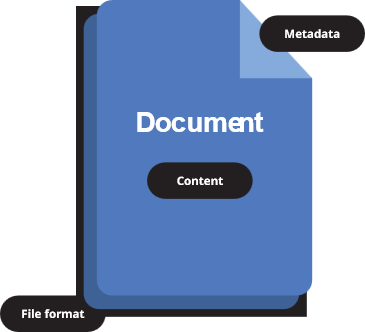
A breakdown of a digital document. Metadata at the top describes the file, the content includes the text, images and other information within it, and the file format acts as a container that organises the data.
Content
A digital file will usually contain content you can view and edit. Depending on the file type, this might be things like:
- text in a document
- rows and formulas in a spreadsheet
- an email message and attachments
- photographs and images
- audio and video recordings
This is the information the file is intended to communicate.
In some cases, digital content is not designed to be read by people. It may be created automatically by systems to record actions, events or conditions. Examples include system logs, transaction histories or sensor data.
Even when not human readable, this content can still provide important evidence and may need to be managed as a record.
Metadata
Metadata is the descriptive information about a record that enables the management, use and preservation of that record through time. When records contain appropriate metadata we can better understand what they are, why they were created and how best to manage them.
Some metadata is generated automatically, such as:
- who created the file
- when it was created or modified
- what system or software created it
- file location or path
- file size.
Metadata can also be added or edited by a user. This might include:
- relevant, related or linked records
- access controls or classifications
- sensitivity statements
- keywords or tags.
When a file is in active use, metadata helps people find and work with it. When digital records are saved in recordkeeping systems or transferred to QSA’s Digital Archive, metadata provides context and supports ongoing access and control.
Without accurate and complete metadata, managing digital records over time becomes significantly more difficult.
File format
The file format defines how the content and metadata is organised and arranged so that software can open and display the file.
Some common file formats would be:
- DOCX and DOC for Microsoft Word documents
- XLSX (Excel) or CSV (Comma Separated Values) for spreadsheets
- PDF for documents and forms
- MP4 for video
- MP3 for audio.
Different formats organise information in different ways. This is why files may appear differently across programs or become difficult to access over time.
When working with digital records, consider how long a file needs to be kept and whether the format will remain supported and accessible. In some cases, files may need to be converted from one format to another to ensure they can still be opened and used. This is known as file format migration.
File format migration should be carefully managed to ensure that:
- all content remains complete and readable
- layout and structure are preserved
- functionality is retained
- metadata continues to support access and context.
If done incorrectly, conversion can result in the loss of information or changes to how the record appears or behaves.
Managing digital files over time
Unlike paper records, digital files do not remain accessible on their own. They rely on software, formats and storage environments that change over time.
Managing digital files includes:
- selecting appropriate formats
- maintaining metadata
- planning for changes such as:
- system upgrades
- migration to new platforms
- transfer to QSA.
Because digital files can be easily copied or altered, additional checks are needed to ensure they remain complete and reliable.
One way to support this is through integrity checking. A common method to do this is by generating a checksum, a unique string of characters that serves as the digital fingerprint of a file. If the file changes, even slightly, it will generate a different checksum.
Checksums can be used to:
- make sure the correct digital file is transferred
- detect any corruption, missing data or manipulation of the digital file
- support long term preservation through scheduled checking.
When transferring files to the Digital Archive, checksums are used to make sure QSA has received the correct files, and that no unintended changes or data loss has occurred during the transfer process. QSA regularly uses checksums to ensure all files remain accurate when managed in the Digital Archive.
Digital records ingested into the Digital Archive also go through other preservation processes such as quarantine, virus scanning, format identification and, in some cases, format normalisation to support long term access.
To learn more about storing, protecting and maintaining digital public records, visit our pages on maintaining digital records. If you’re interested in learning more about the Digital Archive, decommissioning business systems or migrating file formats, you can also reach out to the Digital Archive team at QSA.


Leave a Reply